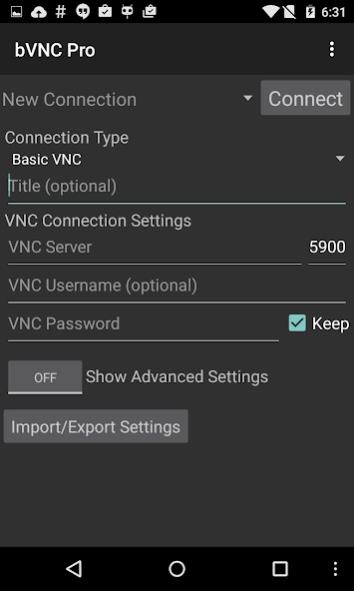
About bVNC Pro: Secure VNC Viewer
Connect to your computers completely privately from anywhere over peer-to-peer VPN with zero network configuration! Sign up for Morpheusly by visiting
Connect to your computers completely privately from anywhere over peer-to-peer VPN with zero network configuration! Sign up for Morpheusly by visiting www.morpheusly.com to Download and Get Started.
Need bVNC on iOS or Mac OS X? Now available at
https://apps.apple.com/ca/app/bvnc-pro/id1506461202
Thank you for supporting my work and GPL open-source software by donating! Please also rate my application, and tell everyone about it!
Release notes:
https://github.com/iiordanov/remote-desktop-clients/blob/master/bVNC/CHANGELOG-bVNC
Older versions:
https://github.com/iiordanov/remote-desktop-clients/releases
Report bugs:
https://github.com/iiordanov/remote-desktop-clients/issues
If you have questions, please don't post a negative review, rather, ask your question on the forum so everybody benefits:
https://groups.google.com/forum/#!forum/bvnc-ardp-aspice-opaque-remote-desktop-clients
Check out my RDP Client, aRDP
https://play.google.com/store/apps/details?id=com.iiordanov.freeaRDP
For Proxmox and oVirt, get Opaque
https://play.google.com/store/apps/details?id=com.undatech.opaque
bVNC is a secure, open source VNC client. Its features include:
- Windows, Mac, Linux, BSD, or any other OS with a VNC server installed
- Fully compatible with PiKVM
- Master password support in the Pro version
- Multi-factor (two-factor) SSH authentication in the Pro version
- Multi-touch control over the remote mouse. One finger tap left-clicks, two-finger tap right-clicks, and three-finger tap middle-clicks
- Left, right and middle button drag/drop if you don't lift the first finger that tapped
- Scrolling with a two-finger drag
- Pinch-zoom
- Force Landscape, Immersive Mode, Keep Screen Awake
- Dynamic resolution changes, allowing you to reconfigure your desktop while connected, and control over virtual machines from BIOS to OS
- Full rotation
- Multi-language
- Full mouse support
- Full desktop visibility even with soft keyboard extended
- SSH tunneling, AnonTLS and VeNCrypt for secure connections
- RealVNC local authentication
- UltraVNC SecureVNCPlugin support
- High-grade encryption superior to RDP using SSH and VeNCrypt (x509 certificates and SSL), preventing man-in-the-middle attacks
- AutoX session discovery/creation like NX client
- Tight and CopyRect encodings for quick updates
- Ability to reduce the color depth over slow links
- Copy/paste integration
- Samsung DEX, Alt-Tab, Start Button capture
- Ctrl+Space capture
- SSH public/private (pubkey)
- Importing encrypted/unencrypted RSA keys in PEM format
- Zoomable, Fit to Screen, and One to One scaling modes
- Two Direct, one Simulated Touchpad, and one Single-handed input modes
- In single-handed input mode, long-tap to get a choice of clicks, drag modes, scroll, and zoom
- Supports most VNC servers including TightVNC, UltraVNC, TigerVNC, and RealVNC
- Supports Mac OS X built-in remote desktop server (ARD) and Mac OS X authentication
- Stowable on-screen keys
- Right-click with Back button
- D-pad for arrows, rotate D-pad
- Hardware/FlexT9 keyboard support
- Windows Plain VNC with UltraVNC:
http://iiordanov.blogspot.ca/2012/04/how-to-install-and-connect-to-tightvnc.html
- Windows: Secure VNC with VeNCrypt:
https://groups.google.com/d/msg/bvnc-ardp-aspice-opaque-remote-desktop-clients/c9ptU7UekE4/rOzNlkiaEgAJ
- Windows: Secure VNC over SSH:
http://iiordanov.blogspot.ca/2012/04/tunneling-vnc-over-ssh-to-windows.html
- Ubuntu: Remote Desktop on 20.04 and older:
http://www.howtoforge.com/configure-remote-access-to-your-ubuntu-desktop
- Linux: x11vnc AutoX Secure VNC over SSH:
http://iiordanov.blogspot.ca/2012/10/looking-for-nx-client-for-android-or.html
- Mac OS: Remote Desktop:
http://iiordanov.blogspot.ca/2012/04/how-to-connect-to-mac-os-x-using-bvnc.html
- Mac OS: Secure Remote Desktop over SSH:
http://iiordanov.blogspot.ca/2012/04/tunneling-vnc-over-ssh-to-mac-os-x.html
Code
https://github.com/iiordanov/remote-desktop-clients
Previous Versions
Here you can find the changelog of bVNC Pro: Secure VNC Viewer since it was posted on our website on 2014-06-14 03:06:23.
The latest version is 6.4.7 and it was updated on 2026-10-10 17:17:51. See below the changes in each version.
bVNC Pro: Secure VNC Viewer version v6.4.7
Updated At: 2026-08-21
Changes: v6.4.7
- Bugfixes
v6.4.5
- UltraVNC SecureVNCPlugin support including AES ciphers, passphrase, and client auth keys
- Bugfixes
v6.4.4
- Bugfixes
v6.4.3
- Increased Touch Scroll Sensitivity Slider range
- Touchpad Sensitivity Slider
- Simplified AndroidManifest files for better maintainability
- Bugfixes
- Translations
v6.4.0
- New editable Default Connection profile — the basis for every new connection
- Advanced Settings: added Input Method & Scaling, and grouped into sections
- Input method,
bVNC Pro: Secure VNC Viewer version v6.4.5
Updated At: 2026-07-27
Changes: v6.4.5
- UltraVNC SecureVNCPlugin support including AES ciphers, passphrase, and client auth keys
- Bugfixes
v6.4.4
- Bugfixes
v6.4.3
- Increased Touch Scroll Sensitivity Slider range
- Touchpad Sensitivity Slider
- Simplified AndroidManifest files for better maintainability
- Bugfixes
- Translations
v6.4.0
- New editable Default Connection profile — the basis for every new connection
- Advanced Settings: added Input Method & Scaling, and grouped into sections
- Input method, scaling & toolbar
bVNC Pro: Secure VNC Viewer version v6.4.4
Updated At: 2026-06-21
Changes: v6.4.4
- Bugfixes
v6.4.3
- Increased Touch Scroll Sensitivity Slider range
- Touchpad Sensitivity Slider
- Simplified AndroidManifest files for better maintainability
- Bugfixes
- Translations
v6.4.0
- New editable Default Connection profile — the basis for every new connection
- Advanced Settings: added Input Method & Scaling, and grouped into sections
- Input method, scaling & toolbar position moved from Global to the Default Connection profile
- Implemented resetting Default Connection setti
bVNC Pro: Secure VNC Viewer version v6.4.3
Updated At: 2026-06-05
Changes: v6.4.3
- Increased Touch Scroll Sensitivity Slider range
- Touchpad Sensitivity Slider
- Simplified AndroidManifest files for better maintainability
- Bugfixes
- Translations
v6.4.0
- New editable Default Connection profile — the basis for every new connection
- Advanced Settings: added Input Method & Scaling, and grouped into sections
- Input method, scaling & toolbar position moved from Global to the Default Connection profile
- Implemented resetting Default Connection settings to initial val
bVNC Pro: Secure VNC Viewer version v6.3.3
Updated At: 2026-05-17
Changes: v6.3.3
- Faster detection of IPV6 addresses vs IPV4 addresses with host:port format
- Improved clipboard handling
v6.3.1
- Fix for potential app freezes when connecting to unreachable hosts
- New On-screen Modifier, F-keys, Control chars, and other special chars
- New Send Text dialog
- Replaced Toast messages with Snackbar messages that show full text
v6.2.9
- Option and automation for disabling Battery Optimizations
- Fix for OK button color when deleting connections
v6.2.7
- Fix yes/no and a
bVNC Pro: Secure VNC Viewer version v6.2.8
Updated At: 2026-03-16
Changes: v6.2.7
- Fix yes/no and alert dialogs crash on older Androids
v6.2.6
- Localized the app into most supported languages
- Ensured all strings are present in existing localizations
- Improved messaging
v6.2.4
- UTF-8 clipboard support
v6.2.3
- Launch app into separate task started via URI intent
v6.2.2
- UI Refresh
- Light/Dark mode theme while not connected
- Bugfixes
v6.2.1
- Updated translations
v6.1.9
- Maintenance and stability updates
- Fix for servers that don't send image until input is s
bVNC Pro: Secure VNC Viewer version v6.3.1
Updated At: 2026-03-16
Changes: v6.3.1
- Fix for potential app freezes when connecting to unreachable hosts
- New On-screen Modifier, F-keys, Control chars, and other special chars
- New Send Text dialog
- Replaced Toast messages with Snackbar messages that show full text
v6.2.9
- Option and automation for disabling Battery Optimizations
- Fix for OK button color when deleting connections
v6.2.7
- Fix yes/no and alert dialogs crash on older Androids
v6.2.6
- Localized the app into most supported languages
- Ensured all string
bVNC Pro: Secure VNC Viewer version v6.2.5
Updated At: 2026-02-21
Changes: v6.2.4
- UTF-8 clipboard support
v6.2.3
- Launch app into separate task started via URI intent
v6.2.2
- UI Refresh
- Light/Dark mode theme while not connected
- Bugfixes
v6.2.1
- Updated translations
v6.1.9
- Maintenance and stability updates
- Fix for servers that don't send image until input is sent
v6.1.7
- Fix for back button right-click
- Fix for pointer offset in windowed mode
- Fix for navigation bar with immersive mode disabled hiding part of desktop
v6.1.6
- Fixes to import/export and
bVNC Pro: Secure VNC Viewer version v6.2.2
Updated At: 2026-01-21
Changes: v6.2.2
- UI Refresh
- Light/Dark mode theme while not connected
- Bugfixes
v6.2.1
- Updated translations
v6.1.9
- Maintenance and stability updates
- Fix for servers that don't send image until input is sent
v6.1.7
- Fix for back button right-click
- Fix for pointer offset in windowed mode
- Fix for navigation bar with immersive mode disabled hiding part of desktop
v6.1.6
- Fixes to import/export and master password hamburger menu actions
- Show toast on long-tap of on-screen mouse wheel
- Fix
bVNC Pro: Secure VNC Viewer version v6.2.0
Updated At: 2025-12-14
Changes: v6.1.9
- Maintenance and stability updates
- Fix for servers that don't send image until input is sent
v6.1.7
- Fix for back button right-click
- Fix for pointer offset in windowed mode
- Fix for navigation bar with immersive mode disabled hiding part of desktop
v6.1.6
- Fixes to import/export and master password hamburger menu actions
- Show toast on long-tap of on-screen mouse wheel
- Fix for nav buttons covering content when immersive mode is disabled
v6.1.5
- Updated sqlcipher to 4.5.4
v6.1